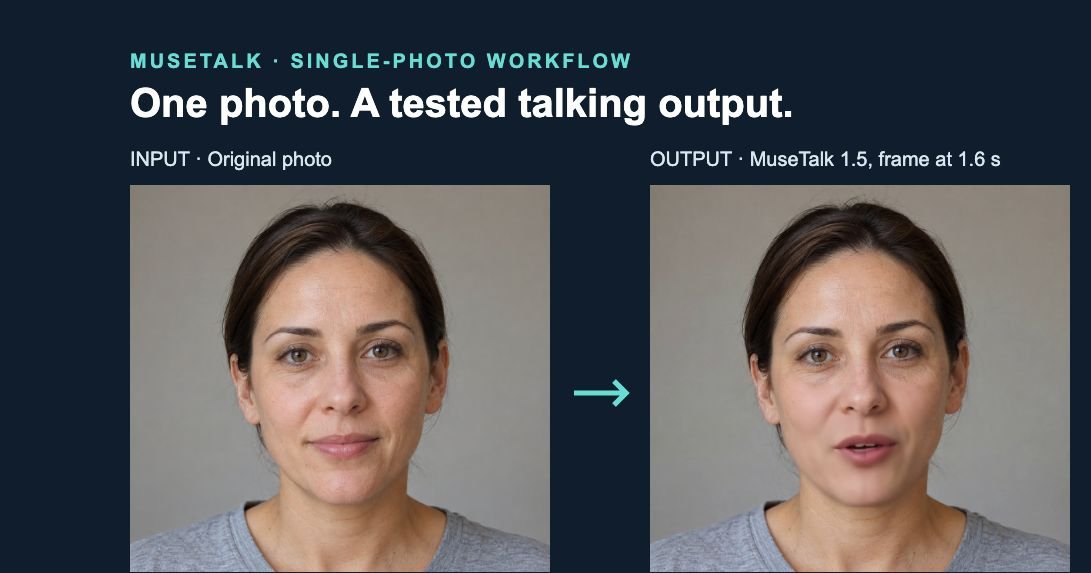
Published 13 October 2026 · examples tested 12 October 2026. These examples show what changed when MuseTalk processed one permitted fictional portrait with one synthetic speech clip. Whole-frame views show the composition; matched crops expose lip edges, skin detail and blending. They are recorded results, not a ranking of models or a promise that one setting works for every face.
Browse the MuseTalk examples gallery for five retained outputs, playable clips, permitted inputs, exact settings and honest limitations.
Inspect the before/after examples · See exact settings · Follow the single-photo tutorial
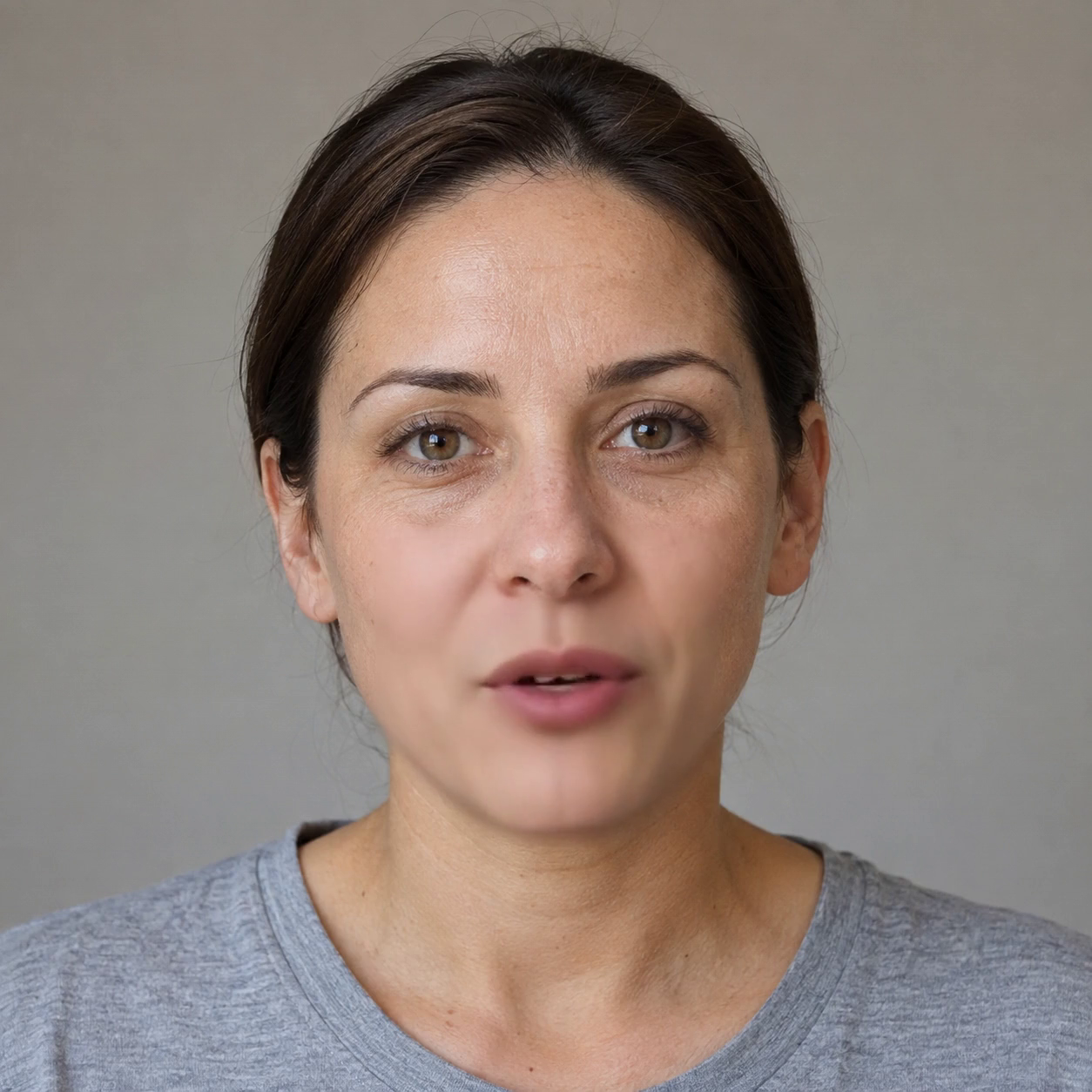
Matched inputs and framing
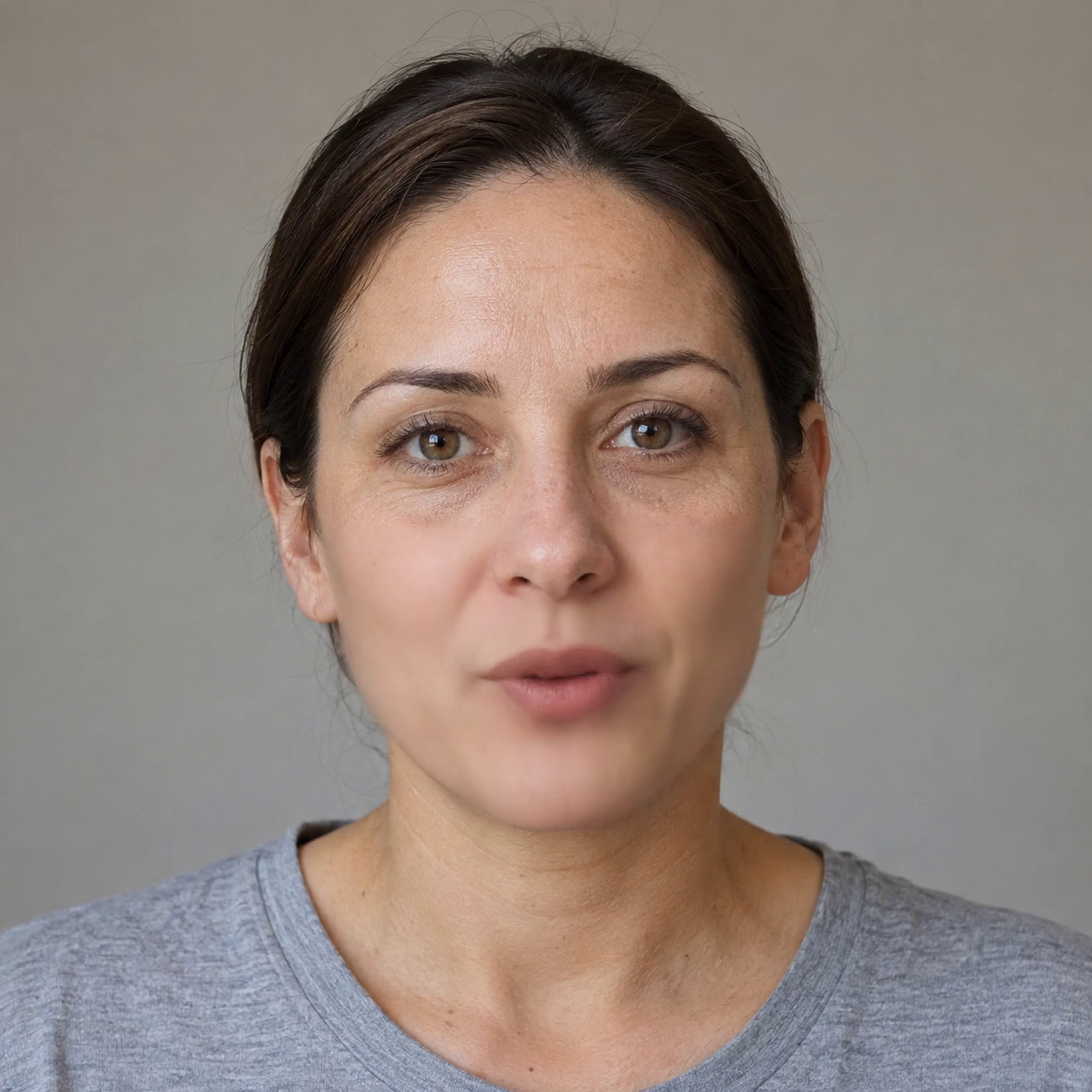
| Photo | Original 1254 × 1254 PNG, one front-facing fictional adult, clear mouth, even lighting. The input was not resized before inference. |
|---|---|
| Audio | Synthetic eSpeak speech, mono WAV, 16 kHz, 3.6318125 seconds. “Please bring me a blue mug. We can meet on Friday.” |
| Output | 1254 × 1254, 25 fps, 90 frames, 3.632 seconds; H.264 video and AAC audio. Selected clips passed complete decoding. |
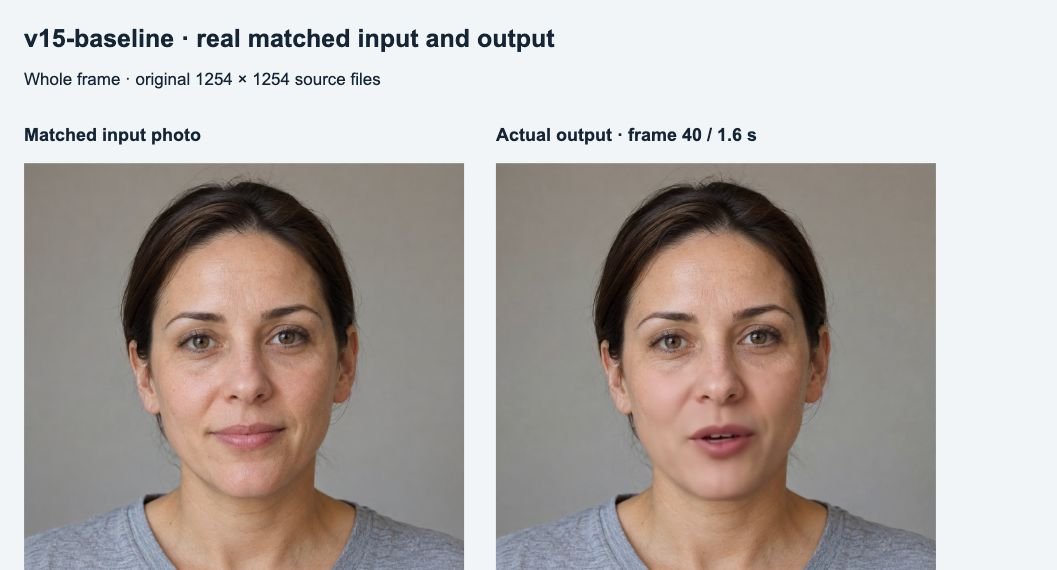
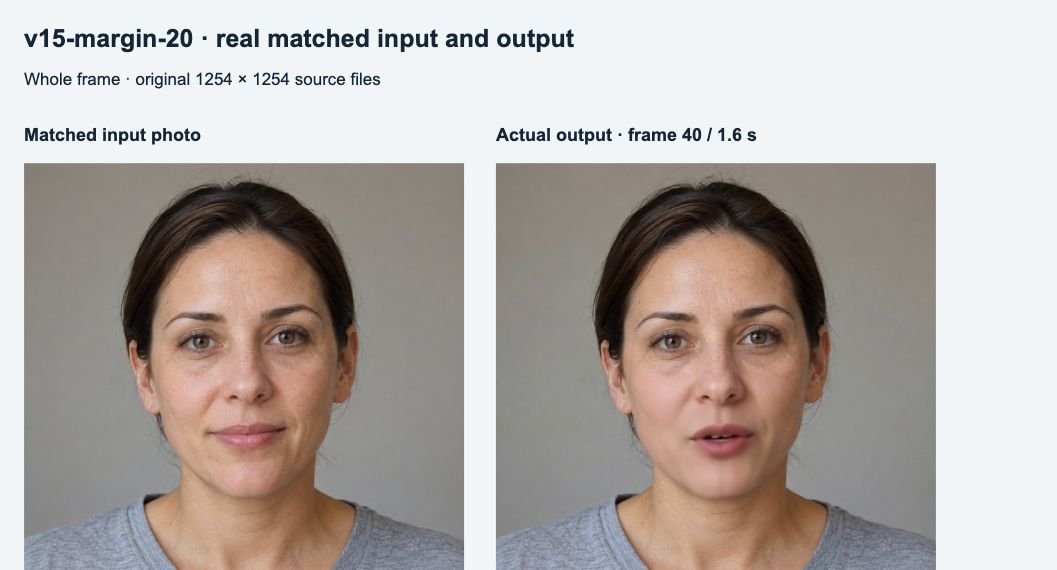
| Frame selection | Zero-based frame 40 at 1.6 seconds in every example. The input image is the same for every pair; it has no timestamp. |
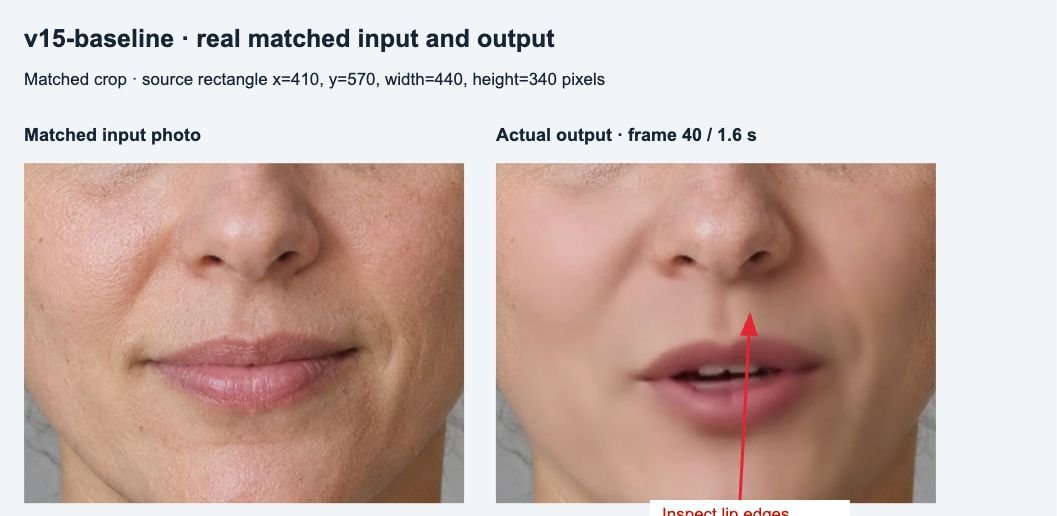
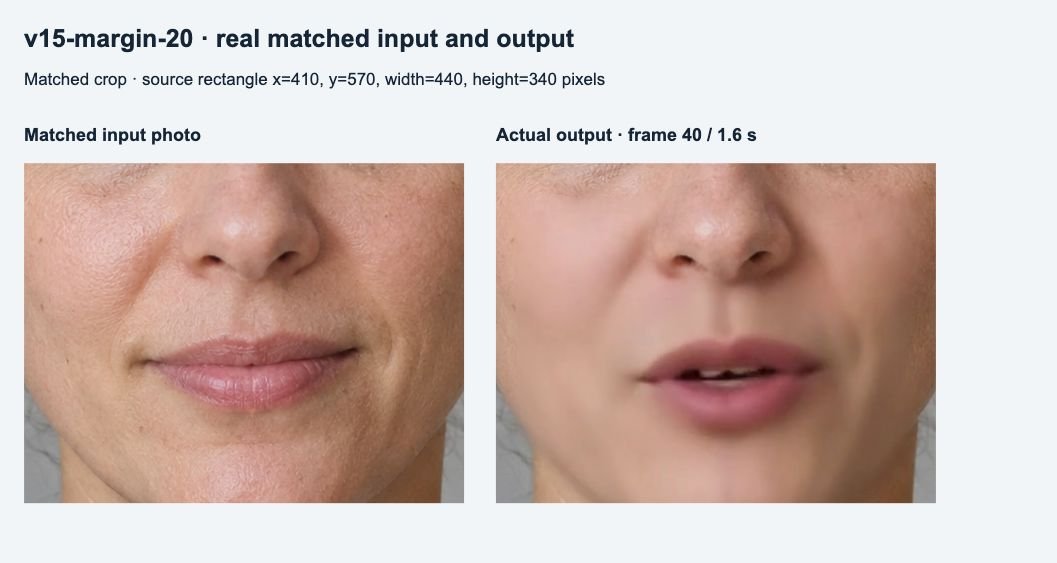
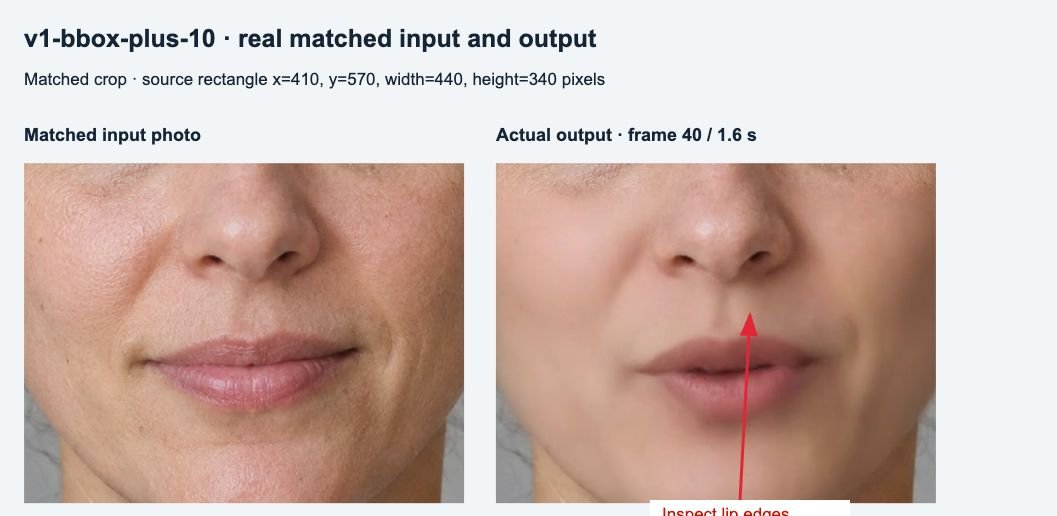
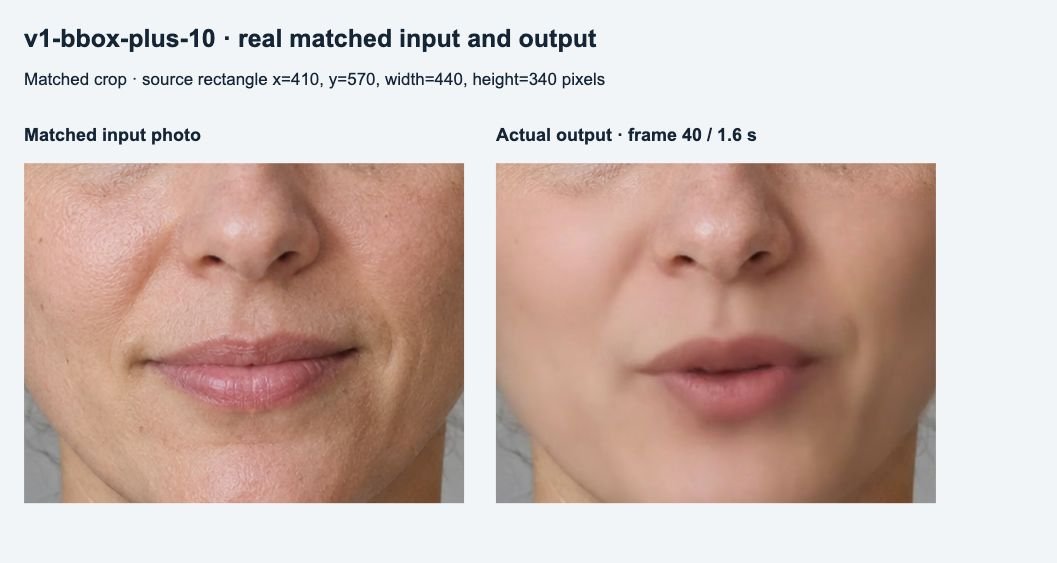
| Matched crop | Source rectangle x=410, y=570, width=440, height=340 pixels in both input and output. The crop is a viewing aid, not an inference setting. |
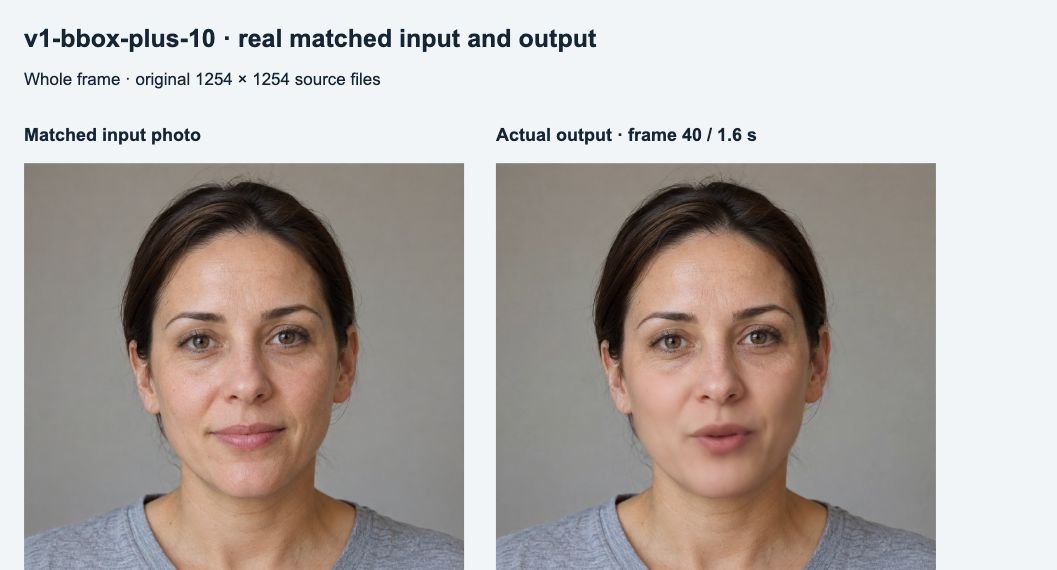
The full-frame comparison is scaled for the page. Crops use the same source coordinates and scale on both sides. These are real browser captures of the saved PNGs; focus copies add arrows only. Raw views and native files are linked below. No retouching, sharpening or skin smoothing was applied to the examples.
Three real before/after examples
Choosing between models? The MuseTalk 1.5 vs LatentSync 1.6 comparison adds matched input/output clips, RTX 3090 timings and a separate subjective visual review.
1. MuseTalk 1.5 baseline
The crop shows an open mouth and softer surrounding skin than the original photo. Whole-frame framing is retained. The observed change demonstrates synthesis; it does not establish accurate lip sync throughout the clip.
View raw crop comparison · Open original photo · Open native output frame · Watch the complete example (MP4)
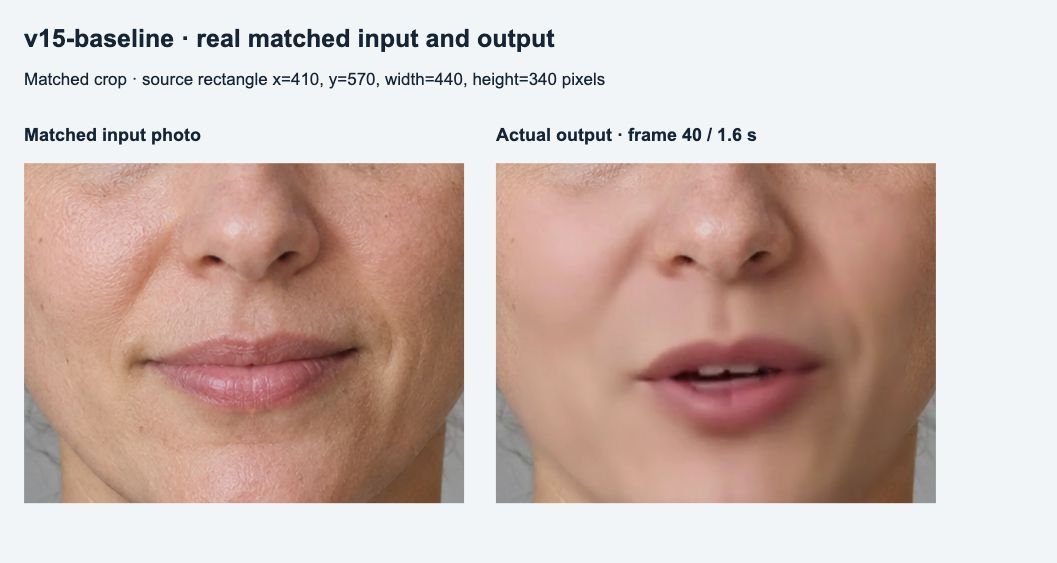
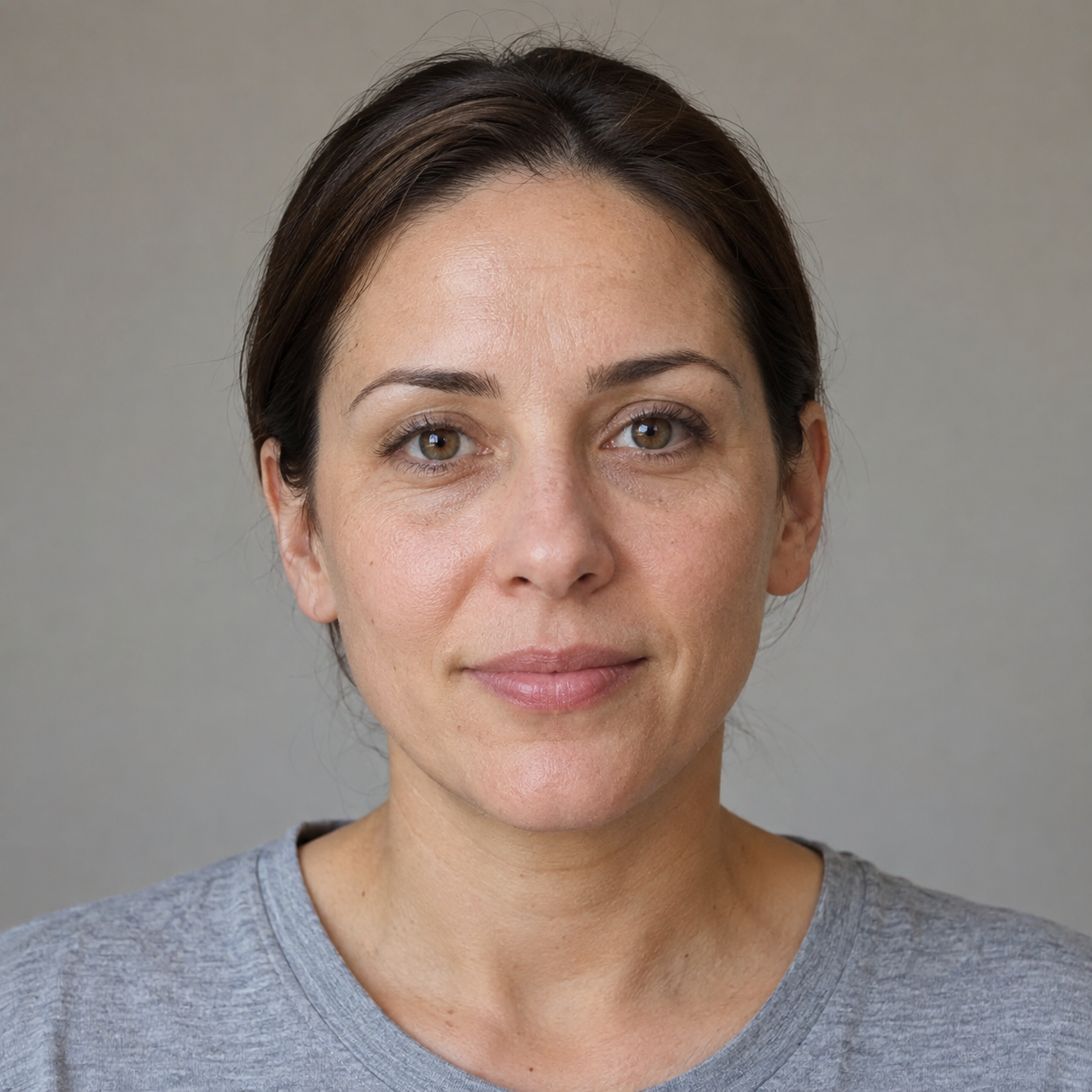
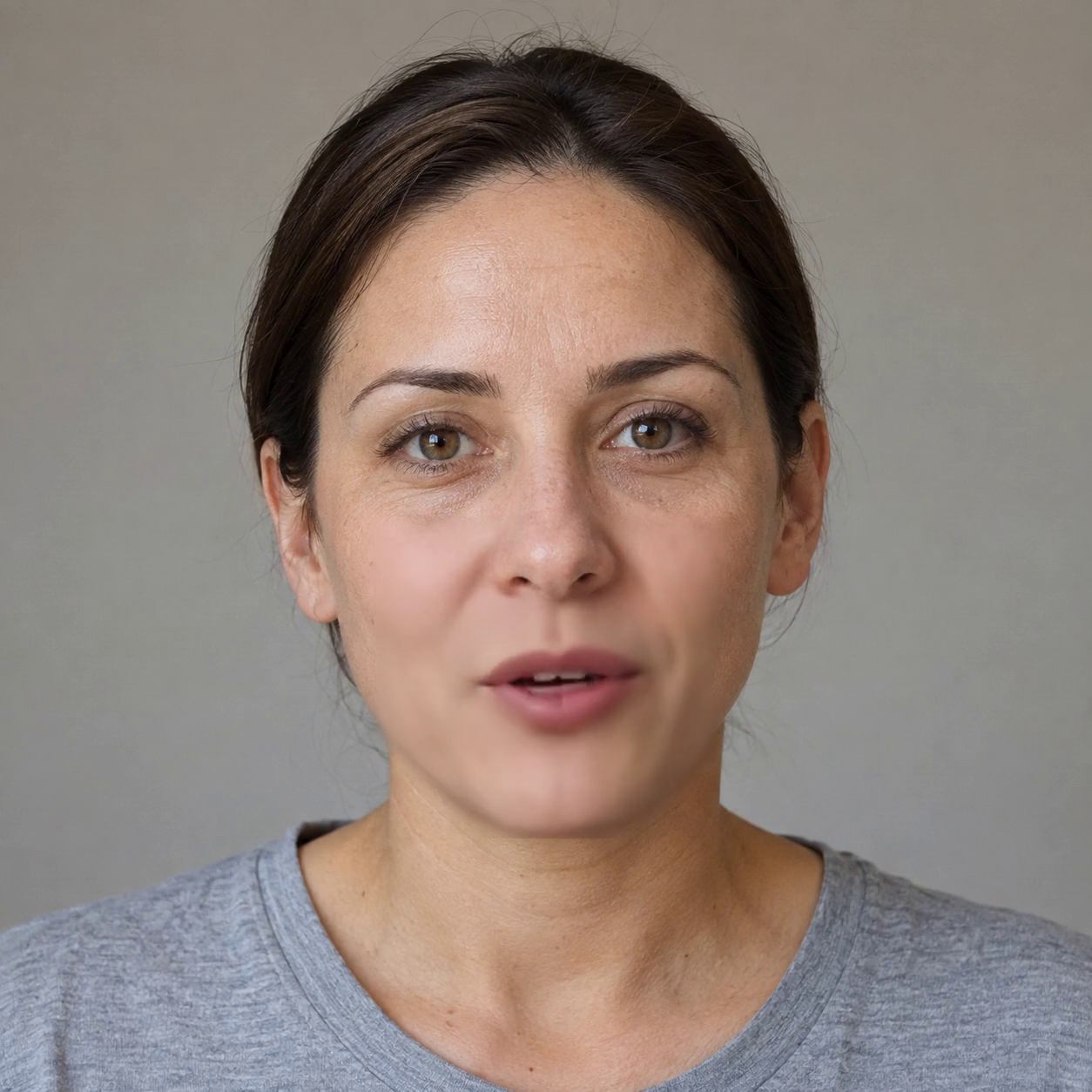
2. MuseTalk 1.5 with extra_margin=20
This run requested extra_margin=20 instead of the 1.5 baseline value of 10. It changes lower-crop extension and can affect the synthesized/blended area. The crop is still visibly softer than the original. This frame does not show a universal improvement.
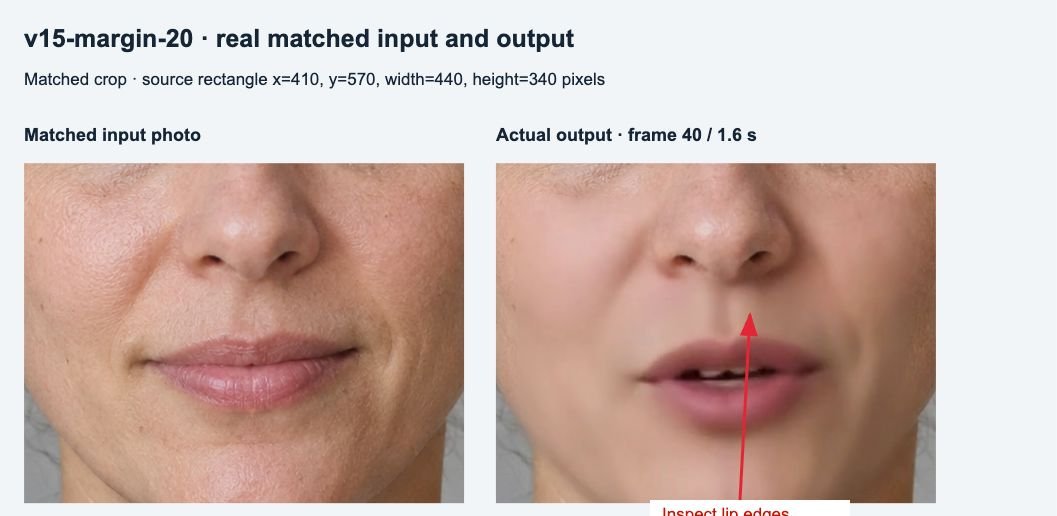
View raw crop comparison · Open original photo · Open native output frame · Watch the complete example (MP4)
3. MuseTalk 1.0 with bbox_shift=+10
This run requested bbox_shift=+10 instead of its same-version baseline value of 0. That control adjusts the face crop in 1.0. The selected output has a different mouth shape and softer skin. Comparing it with 1.5 also changes model version and blending behavior; it is not a one-setting comparison across versions.
View raw crop comparison · Open original photo · Open native output frame · Watch the complete example (MP4)
Exact settings behind each result
All runs used the identical photo/audio, seed 20261012, FP16, batch size 2, output fps 25 and four CPU threads. No tracked upstream source files were edited. The wrapper selected math attention, disabled flash/memory-efficient attention and requested strict deterministic algorithms. These measures did not eliminate all repeat variation.
| Example | Model | bbox_shift | extra_margin | Blending mode | Cheek widths |
|---|---|---|---|---|---|
| Baseline | 1.5 | 0 | 10 | jaw | 90 / 90 |
| Margin variant | 1.5 | 0 | 20 | jaw | 90 / 90 |
| Crop variant | 1.0 | +10 | Ignored; CLI requested 10 | Effective raw; CLI requested jaw is ignored | CLI 90 / 90 ignored; not used by raw jaw erosion |
For 1.5, the baseline and margin example differ in only one requested parameter. For 1.0, +10 is compared with the 0 baseline in the complete quality-test evidence archive. The table describes effective behavior as well as requested values so ignored settings are not presented as quality controls.
Which controls apply to your version?
| Control | 1.0 behavior | 1.5 behavior | Values actually tested |
|---|---|---|---|
| bbox_shift | Supported face-crop adjustment | Source forces 0 | 1.0: −10, 0, +10. 1.5: requested +20 as an ignored-control check. |
| extra_margin | Ignored | Extends the lower crop, in source-image pixels | 1.5: 0, 10, 20. 1.0: requested 20 as an ignored-control check. |
| parsing_mode | Effective raw; CLI mode ignored | jaw, raw and neck supported | All three modes on 1.5. |
| left/right_cheek_width | CLI values ignored | Used with jaw mask; parser operates in 512-pixel space | 1.5: 90/90, 60/90 and 90/60. |
| Precision | FP16 tested | FP16 and FP32 tested | FP32 omits –use_float16. It was not proven to improve sharpness. |
Support was checked against the pinned official inference source and face parser. These are recorded test values, not recommended limits or a universal preset.
How to judge a result
- Framing: inspect the full frame for unwanted changes, then inspect the mouth crop for seams, teeth, lip shape and skin detail. A large output canvas can hide a soft synthesized face crop.
- Audio: play the complete output with sound. A still frame cannot demonstrate timing, phoneme alignment or temporal stability. Every example here uses the same short clean synthetic clip; noisy recordings, languages, pauses and longer speech were not compared.
- Settings: change one supported control at a time and compare the same audio and timestamps. Keep source framing fixed. Select values for the actual face rather than copying a universal “best” preset.
Limits of these examples
- A single photo repeats the static base image. It does not generate natural head motion or blinks. Mouth, lower-face and cheek pixels may change through synthesis and blending.
- MuseTalk synthesizes a 256 × 256 face crop. A 1254 × 1254 canvas does not recreate the input’s fine skin detail.
- The 1.5 baseline/repeat pair matched all 90 pre-encoding frame hashes. The 1.0 repeat differed, and a 1.5 run changing an ignored bbox parameter also differed. Small pixel differences cannot all be attributed to the requested control.
- All direct-photo runs logged a post-write cleanup error:
local variable 'save_dir_full' referenced before assignment. The retained MP4s existed and passed full decoding; an exit code alone was insufficient validation. - One portrait, one 3.63-second sentence and three selected frames do not establish a quality ranking. No lip-sync score, human-rating study or universal setting claim is made.
Reproduce and compare
RTX 4090, Python 3.10.18, Torch 2.0.1+cu118 and CUDA 11.8. Official source commit 0a89dec45a0192b824e3cf4daf96c239440c5ed8; MuseTalk model repository revision 2bcb936e2fddb4d86db4c62fd45b387d0c061571. Exact commands, model hashes, configs, logs, all 15 test videos and measured differences are retained in the evidence archive.
- Single-photo tutorial and workflow kit
- MuseTalk 1.0 vs 1.5 comparison and examples
- Video lip-sync tutorial
- Explore all quality-test evidence · View measured results (CSV)
Compare facial detail and process time in the matched MuseTalk vs Wav2Lip test, including full frames, identical mouth crops and original clips. Read the MuseTalk vs Wav2Lip comparison.
3 thoughts on “MuseTalk Quality Guide: Real Before/After Examples and Exact Settings”