Updated and tested: 7 October 2026. How much GPU memory does MuseTalk need, and how long will a first video take? This guide separates our measured MuseTalk 1.5 file-inference results from upstream examples. Use the checks below to decide whether to try your own GPU or use a cloud instance.
Quick answer: what we actually verified
We completed 12 verified runs on one RTX 4090 (24564 MiB VRAM). For the same 3.63-second sample, the measured process peak ranged from 7.40 to 7.47 GiB. FP16 at batch size 2 took a median 27.13 seconds from Python process launch to exit, including imports, model loading, face preparation, encoding and cleanup.
This demonstrates one working setup. It does not establish a minimum VRAM requirement, predict another GPU’s speed or prove that an 8 GB card can finish the same pipeline. An RTX 4090 is a verified option here; you do not need to buy one to try MuseTalk.
- Already own an NVIDIA GPU? Check CUDA and run the short shared sample before buying hardware.
- No compatible local GPU? Use the cloud setup route, or check the current Colab status and fallback.
- Just want to see an example? Play the measured output, or open the playground guide.
Get the benchmark evidence and reproduction kit (ZIP) · Get all 12 measurements (CSV). The ZIP includes the inputs, configuration, raw timings and memory samples, environment/model records, per-run outputs and scripts.
Measured VRAM and time: RTX 4090 only
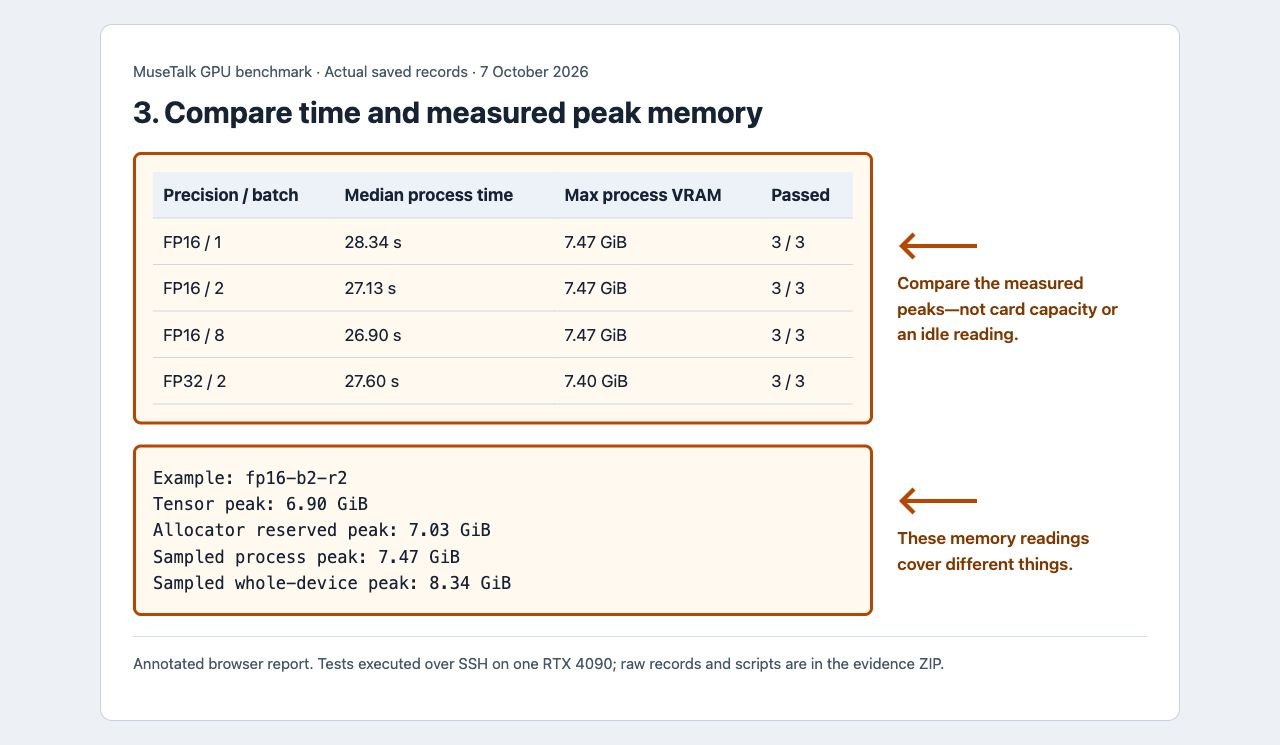
Each setting was run three times in a fresh Python process. Time is the median with the full observed range. Memory is the highest sampled process peak across those three runs, not a median or an idle reading. GiB means 1024 MiB.
| Precision flag | Batch size | Process time: median (range) | Highest process VRAM | Verified runs |
|---|---|---|---|---|
| FP16 | 1 | 28.34 s (28.22–36.40) | 7.47 GiB | 3 / 3 |
| FP16 | 2 | 27.13 s (26.92–27.16) | 7.47 GiB | 3 / 3 |
| FP16 | 8 | 26.90 s (26.62–27.02) | 7.47 GiB | 3 / 3 |
| FP32 | 2 | 27.60 s (27.42–27.89) | 7.40 GiB | 3 / 3 |
What changed? Batch sizes 1, 2 and 8 did not materially lower the full-process memory peak in this short sample. FP32 also had a similar lifetime peak. Do not assume a lower batch or FP16 flag always reduces the startup peak: this pipeline has several components, and the flag does not convert every component to FP16. We did not isolate the specific allocation that established the peak.
FP16 is the tested default for the tutorial. This benchmark does not compare visual quality or prove FP32 improves it. FP32 here means the main models were not converted to half precision; PyTorch’s default TF32 convolution setting remained enabled, and TF32 matrix multiplication remained disabled.
Why “GPU memory used” has more than one answer
| Metric | Example: FP16 batch 2, repetition 2 | What it covers |
|---|---|---|
| Tensor peak | 6.90 GiB | Maximum GPU tensor memory recorded by PyTorch over the process lifetime |
| Reserved peak | 7.03 GiB | Maximum memory managed by PyTorch’s caching allocator |
| Sampled process peak | 7.47 GiB | NVML reading for the newly launched inference process |
| Sampled whole-device peak | 8.34 GiB | All GPU memory use, including the pre-existing baseline |
The whole-device baseline across runs was 878 MiB; an existing compute process remained present. Whole-device use peaked at 8.34 GiB across the suite. We left the existing ComfyUI environment unchanged. Leave headroom for other applications, drivers and workloads rather than equating the process peak with a card’s required capacity.
NVML was sampled every 100 milliseconds and can miss brief spikes. PyTorch peaks measure different allocations. See PyTorch tensor-peak documentation and reserved-memory documentation.
Where the time went
Median synchronized stage durations for FP16 batch size 2:
| Stage | Median time |
|---|---|
| Imports and GPU initialization | 4.16 s |
| Model and configuration loading | 7.61 s |
| Extract source frames | 0.42 s |
| Audio feature extraction | 0.89 s |
| Face detection and latent preparation | 4.93 s |
| Generate and decode face frames | 2.81 s |
| Blend faces and write PNG frames | 4.45 s |
| H.264 encoding | 0.40 s |
| Add audio to MP4 | 0.40 s |
| Temporary-file cleanup | 0.03 s |
The stage timer starts inside the script; process wall time also includes launch and teardown. Independently calculated stage medians need not sum exactly to the median total. The first run of the suite took 36.40 seconds, including 8.08 seconds for audio features; later runs may benefit from on-disk library/JIT and filesystem caches.
This is offline file inference, not a live streaming test. A 3.63-second clip took much longer than 3.63 seconds end to end. Face-generation throughput excludes preparation and encoding and should not be presented as user-visible real-time latency. Prepared-avatar tests are a separate experiment.
Exact benchmark conditions
| Condition | Recorded value |
|---|---|
| Test date | 7 October 2026 |
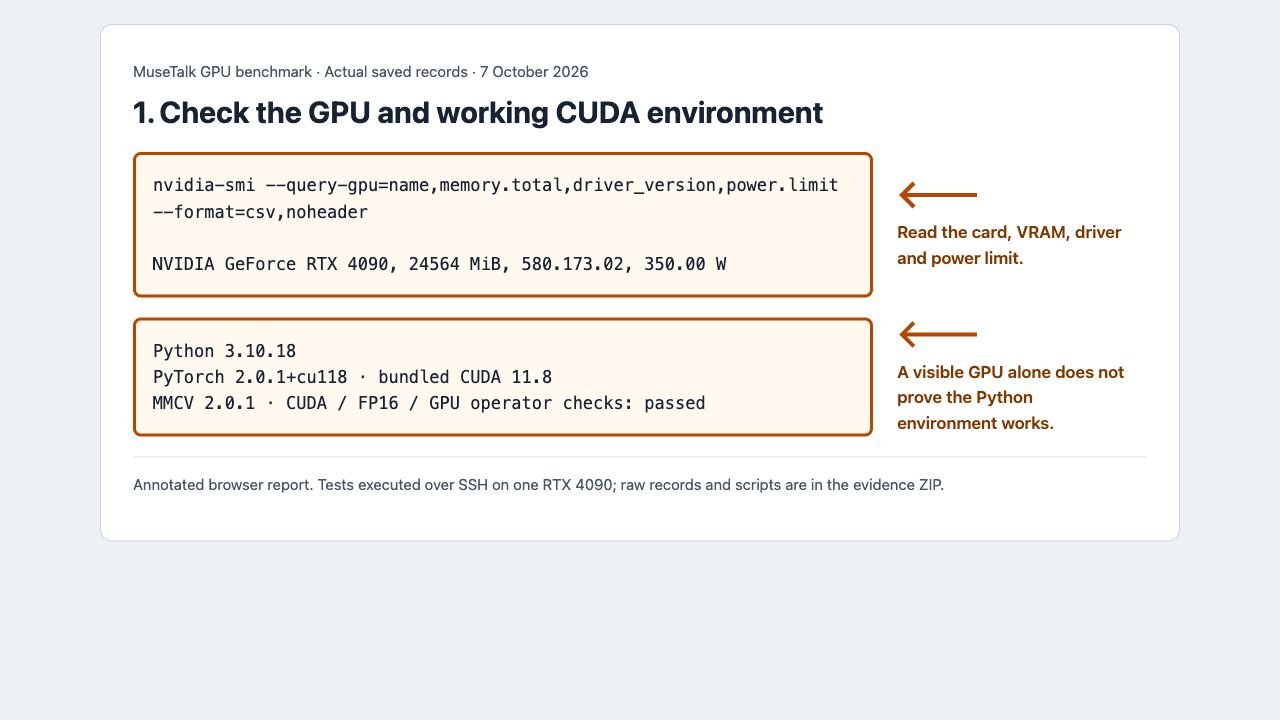
| GPU / driver / offered power limit | RTX 4090 · 24564 MiB · 580.173.02 · 350 W |
| CPU / operating system | Host reports Xeon W-2155; PyTorch used 10 CPU threads · Ubuntu 24.04.4, Linux x86_64 |
| Python / PyTorch / bundled CUDA | 3.10.18 · 2.0.1+cu118 · 11.8 |
| MMCV / MMPose | 2.0.1 · 1.1.0 |
| MuseTalk / commit | 1.5 · 0a89dec45a0192b824e3cf4daf96c239440c5ed8 |
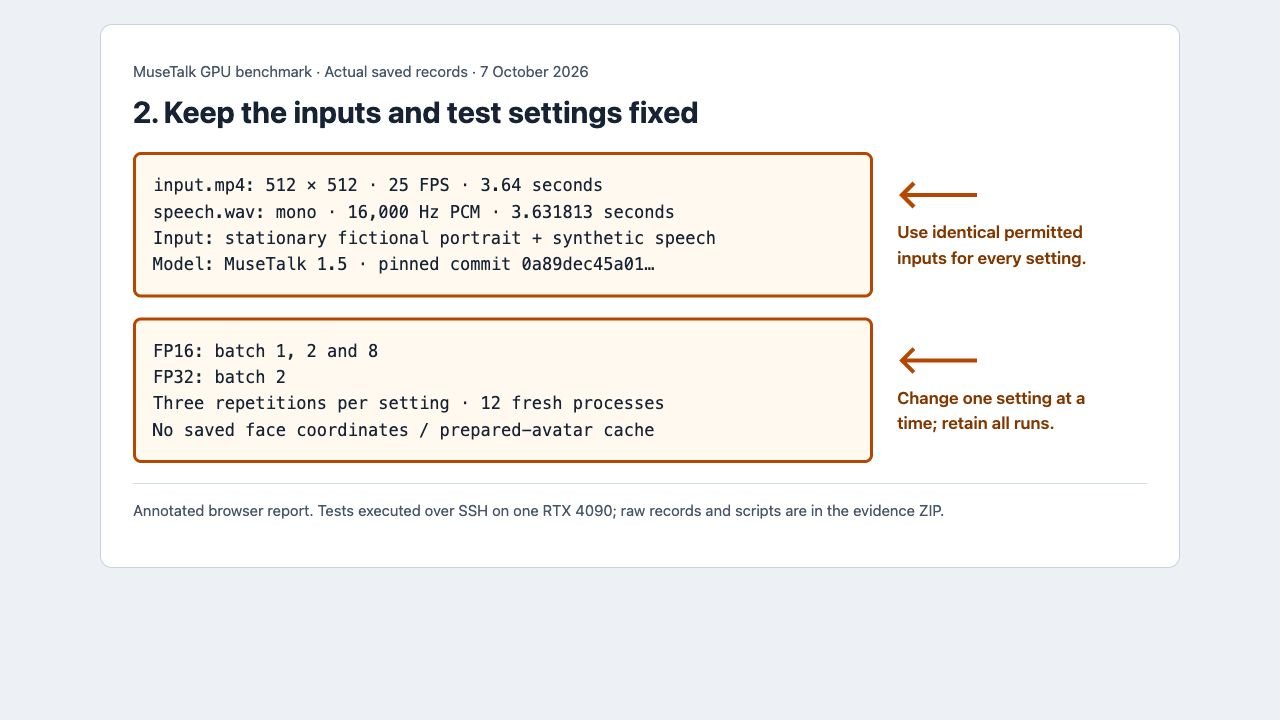
| Input video | Stationary fictional portrait · 512 × 512 · 25 FPS · 3.64 seconds |
| Input audio | Synthetic speech · mono 16 kHz PCM WAV · 3.631813 seconds |
| Models | Pinned MuseTalk 1.5 UNet, SD VAE, Whisper and face-processing weights; hashes included |
| Processing | Normal file inference; FP16 batch 1/2/8 and FP32 batch 2; no saved coordinates |
| Timing | Fresh-process launch-to-exit wall time plus CUDA-synchronized stage boundaries |
| Excluded from inference time | Environment installation, model downloads, upload/download and independent output verification |
All tests use the same permitted inputs. The portrait is fictional and project-generated; the original speech was synthesized with eSpeak NG. This is a stationary-face demonstration, not a moving-speaker, long-video or quality benchmark.
Upstream random latent sampling was not seeded; these comparisons concern performance and memory, not identical pixel output. The rented host’s power limit and shared resources can affect speed. No hardware clocks were changed.
Implementation reference: the exact official MuseTalk commit tested. Model identities and checksums are included in the download.
Step 1: Check your GPU and Python environment
In your Linux GPU terminal, first check the device:
nvidia-smi --query-gpu=name,memory.total,memory.used,driver_version --format=csv
command -v ffmpeg
ffmpeg -version
Then run the CUDA check using the Python executable from your MuseTalk environment, not an unrelated system Python:
/workspace/d10-runtime/muse-env/bin/python -c "import torch; print(torch.__version__, torch.version.cuda); print(torch.cuda.is_available()); x=torch.ones((32,32),device='cuda',dtype=torch.float16); print(torch.isfinite(x @ x).all().item())"Expected: the GPU is listed, FFmpeg is found, CUDA availability is True and the GPU calculation returns True. Replace the Python path if you installed elsewhere.
The CUDA version shown by nvidia-smi is the driver’s supported level; torch.version.cuda identifies the runtime bundled with your PyTorch build. They do not need identical numbers.
This pinned CUDA 11.8 setup was tested on RTX 4090. Do not assume it supports newer GPU architectures such as RTX 50-series. Use a software stack documented for your actual card. A successful nvidia-smi alone is not a successful model test.
Step 2: Run a short sample before a long job
Use the installation guide or cloud setup steps. The tested video tutorial includes the permitted inputs and a full walkthrough. In an existing compatible installation, copy the kit’s sample-kit directory to the MuseTalk repository root, then run:
cd /workspace/d10-runtime/MuseTalk
/workspace/d10-runtime/muse-env/bin/python -m scripts.inference --inference_config sample-kit/sample.yaml --result_dir results/gpu-first-test --unet_model_path models/musetalkV15/unet.pth --unet_config models/musetalkV15/musetalk.json --whisper_dir models/whisper --version v15 --batch_size 2 --use_float16 --ffmpeg_path /usr/bin
The YAML must point to sample-kit/input.mp4 and sample-kit/speech.wav and set result_name: result.mp4. This is the ordinary upstream command with the benchmark’s settings; it does not produce the detailed measurement records by itself. Use a fresh output directory so an old file cannot look like a successful run.
Repeat the full 12-run measurement suite
On a fresh compatible Linux GPU container, extract the benchmark ZIP so its scripts are directly in /workspace/d10-tools, keep at least 25 GiB free for setup, and run:
bash /workspace/d10-tools/reproduce.shThis installs the separate pinned environment, verifies model files, copies the inputs and runs the four settings three times. The suite writes its records to /workspace/d10-evidence. It deliberately refuses to reuse old benchmark output directories.
Review the included README before running; the setup script requires root inside the container and internet access.
Detailed stage timing uses an instrumented copy of the pinned script; the original repository stays unchanged. Synchronization and monitoring overhead are included in our measurements.
Step 3: Verify the finished output
test -s results/gpu-first-test/v15/result.mp4
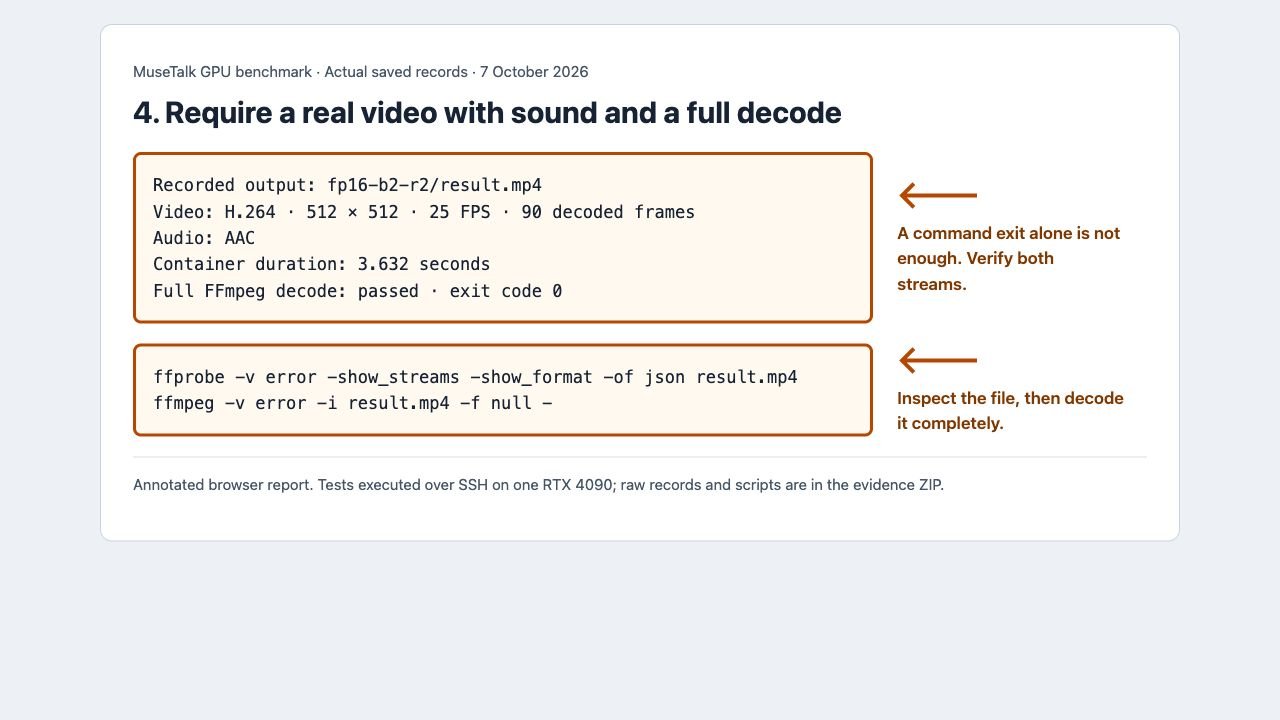
ffprobe -v error -show_streams -show_format -of json results/gpu-first-test/v15/result.mp4
ffmpeg -v error -i results/gpu-first-test/v15/result.mp4 -f null -
Require both a video stream and an audio stream. The final command must decode the complete file without errors. The upstream script catches some processing exceptions, so exit code 0 alone is insufficient. Play the whole output with sound and review mouth movement, timing, jitter and face boundaries.
Actual output from this benchmark
FP16, batch size 2, repetition 2. This output contains H.264 video and AAC audio; the container lasts 3.632 seconds and its video has 90 frames at 25 FPS. Download this measured output. All twelve outputs are in the ZIP.
If you get CUDA out of memory
- Read the first error. Save the GPU model, free memory, complete command, input dimensions and stage where it failed. An import, missing model or FFmpeg error is not an OOM.
- Check other applications. Inspect
nvidia-smiand release GPU memory from your own unused workloads before retrying. - Try a short clip, FP16 and batch size 1. Change one setting at a time. This may help generation memory but did not lower the full-process peak in our sample; startup/model/other-component failures may persist.
- Verify the next output. An attempted repair is successful only when a fresh video with audio passes decoding.
- Use a larger compatible cloud GPU if needed. Keep the same short test and save the failed case. Do not assume buying hardware is the first fix.
For deliberate OOM reproductions, physical 4 GB card limits, and measured one-variable-at-a-time memory reductions, consult our dedicated MuseTalk CUDA Out of Memory Tested Fixes Guide. You can also review the troubleshooting index, model paths and verification and FFmpeg checks.
Upstream evidence: useful context, separate tests
The official Gradio documentation reports a 4 GB RTX 3050 Ti laptop test using FP16, with an eight-second video taking roughly five minutes. That is an upstream demonstration in its stated environment, not our measurement or a guarantee that this pinned normal-inference route fits in 4 GB.
The upstream prepared-avatar workflow reports generation above 30 FPS on a Tesla V100. We did not test a V100, prepared-avatar inference or live streaming here. Those figures are not the end-to-end latency of our file pipeline.
Inference and training need different budgets
Our results are for inference with existing weights. The upstream training section describes an eight-H20 system and tens of gigabytes per GPU, depending on stage and batch size. Do not use this inference benchmark to size a training machine.
Choose a route and preserve your work
- Linux installation and route selector
- Cloud GPU connection, transfer and setup
- Windows installation — not benchmarked in this test
- Colab status and fallback — availability and quotas can vary
- First video tutorial and shared sample kit
On a rented instance, prepare inputs and commands before paying for GPU time. Download outputs, configuration, logs and environment records before stopping or deleting it. Stopping and deleting have different storage/billing effects; check your provider’s controls. Do not delete the only copy of your results.
Compare MuseTalk with LatentSync on RTX 3090
See the MuseTalk 1.5 vs LatentSync 1.6 comparison for six matched fresh-process runs, paired original clips, exact settings and sampled memory on one RTX 3090. Those results use different conditions from this page’s earlier RTX 4090 tests; read each method before comparing figures.
Compare MuseTalk and Wav2Lip on one RTX 3090: six fresh-process runs, sampled memory, original clips and compatibility notes. Read the MuseTalk vs Wav2Lip comparison.